Agenda Widget Plus
Publisher Description
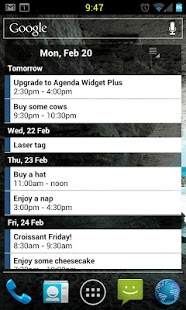
Highly customizable homescreen widget which allows you to show Calendars from Google and Touchdown exchange and the following task applications:
- Team Tasks
- Ultimate ToDo
- Task Sync for Exchange
- DTG GTD
- Astrid
- SSI gTasks
- Dato GTask
- Google Task Organizer (Full version)
- Got To Do (Full version))
Scrolling is available with ADW Launcher, Launcher Pro, Go Launcher and others
Zeam has dropped scrolling launcher support
Please E-MAIL with bug reports, comments are useless.
Unfortunately with this release I have had to drop support for phones with an SDK lower than 2.1 due to upgrades to the settings interface. If you are using an older version of Android please try contact me to help and help me create a 1.5/1.6 compatible version!
IF your events do not show after update (from <1.5.7 to 1.5.8) please untick/retick the calendars on the choose calendars page!
About Agenda Widget Plus
The company that develops Agenda Widget Plus is Everybody all the time. The latest version released by its developer is 1.0 . This app was rated by 5 users of our site and has an average rating of 2.8.
To install Agenda Widget Plus on your Android device, just click the green Continue To App button above to start the installation process. The app is listed on our website since 2013-11-06 and was downloaded 222 times. We have already checked if the download link is safe, however for your own protection we recommend that you scan the downloaded app with your antivirus. Your antivirus may detect the Agenda Widget Plus as malware as malware if the download link to com.roflharrison.agenda.plus is broken.
How to install Agenda Widget Plus on your Android device:
- Click on the Continue To App button on our website. This will redirect you to Google Play.
- Once the Agenda Widget Plus is shown in the Google Play listing of your Android device, you can start its download and installation. Tap on the Install button located below the search bar and to the right of the app icon.
- A pop-up window with the permissions required by Agenda Widget Plus will be shown. Click on Accept to continue the process.
- Agenda Widget Plus will be downloaded onto your device, displaying a progress. Once the download completes, the installation will start and you'll get a notification after the installation is finished.
Program Details
System requirements
Download information
Pricing
Version History
version
posted on 2013-11-06
Any.DO task support,Fixed bug with overdue, today and future task color highlighting
